

Most trend posts are full of buzzwords. Here are four real changes, with the numbers, and what I do about each one. Every number below has a link to its source.
1. AI summaries mean fewer clicks
Sometimes Google puts an AI-written summary at the top of the results. When it does, fewer people click the normal results below it. Pew Research watched 900 adults in the U.S. in March 2025. With an AI summary, people clicked a normal result on 8% of visits. Without one, they clicked on 15%.
Other studies give different numbers, and Google says total clicks are fairly steady (see the roundup here). So I do not trust any single number. I look at my own data in Google Search Console. If a page still shows up in results but gets fewer clicks, an AI summary may be answering the question for the searcher. That is my guess, not proof.
2. Google says there are no special AI tricks
Many people sell "AI SEO" packages. But Google's own page says there are "no additional requirements to appear in AI Overviews or AI Mode." Your page only needs to be in Google's index and allowed to show a short preview. Google also says you do not need special AI files or markup.
I still keep an llms.txt file on this site, because it costs nothing. I just do not count on it for Google. I focus on the basics and on clear answers: right under each question heading, I answer in the first two lines.
3. AI tools pick pages that match the question
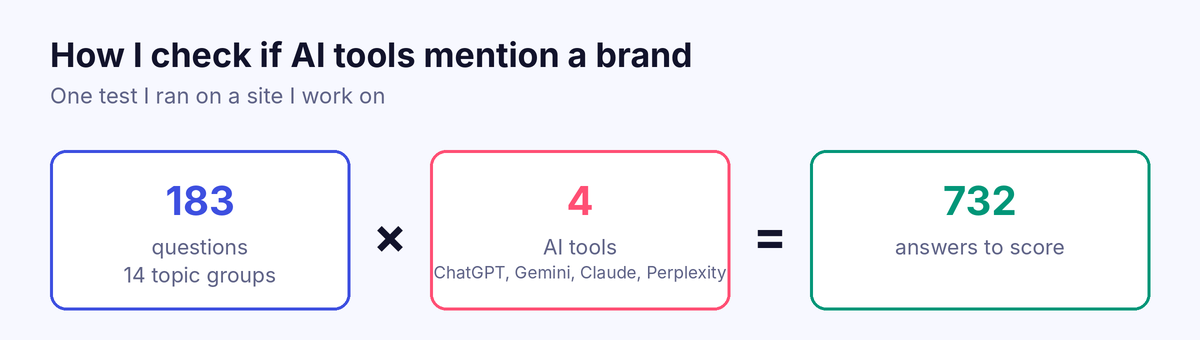
To see if AI tools mention a brand, I keep a list of real questions a buyer might ask. On one site I work on, I asked 183 questions to four AI tools. That gave me 732 answers to check.
When the question named the brand, the brand showed up. When it did not, the brand rarely showed up. And when an AI tool did mention the brand, it almost always linked to the site. So the tools could read the site. We were just missing some topics.
A research paper looked at about 468,000 links that ChatGPT, Gemini and Perplexity gave in their answers. Pages got cited more when one paragraph matched the question and the page title said the same thing. Extras like FAQ boxes did not help when it compared pages on the same site. It is one study, and it shows a link, not proof. Still, it fits what I see.
So I write one clear paragraph for each question, and I describe my business the same way everywhere.
4. A Google update is rolling out now
Google started its November 2026 update on 10 November. It can take up to two weeks, and Google did not say which sites it targets (source). I could not confirm it had finished, so check Google's status page.
The usual advice, as summarized here: wait one full week after it ends, then compare with the week before it started. Do not rewrite pages now. You cannot tell the update from normal ups and downs yet.
What I would do this month
- Track your top 10 pages. Write down their clicks every week.
- Answer first. Put the answer in the first two lines under each question heading.
- Ask AI tools. Try 30 real customer questions, note if your brand shows up, and repeat every three months.
- Wait on the update. After it ends, wait a week, then compare.
What I do not know: how many clicks your kind of searches are losing. Check your own pages before you decide anything.
Sources
- Google users are less likely to click on links when an AI summary appears (Pew Research, 2025)
- AI features and your website (Google Search Central)
- What Drives AI Citations? (research paper)
- Google AI Overviews Tracker (Keywords Everywhere)
- Google November 2026 core update (Search Engine Roundtable) and SE Handbook